
Palbetto - App Case Study
Overview
Palbetto is an app that would function specifically to allow a Game Master/Dungeon Master (herein referred to as a “DM”) of Tabletop Roleplaying games to better connect with and coordinate session times with players in campaigns that they’re currently hosting. The app enables DMs to proactively set their availability and coordinate it with their existing party of players to ensure that sessions are able to be held at regular intervals.
Problem Statement
Tabletop role-playing games – such as Dungeons & Dragons, Call of Cthulhu, and others (if I list all of them, I’ll be here all day) – are very popular with a select swath of adult tabletop gamers (although the age range for these games are not exclusive to this demographic). These games rely on the imagination of the DM and players, in a combined endeavor to create their own story using a party of characters. Parties typically consist of a DM and 4 to 6 players, and game sessions can run anywhere from 2 to 5 hours depending on the party.
Therein lies the issue, as coordinating the schedules of 5 to 7 adults to hold sessions on a regular basis for what is often a considerable chunk of their free time is no easy task. As individuals our life situations fluctuate often unpredictably at times, and this is makes scheduling a session for a tabletop campaign with a group of adult players difficult, albeit not impossible. Persistent coordination and communication are necessary to work around this issue, but these are often things that most people are either unskilled at or lack the time and energy to do.
The goal of Palbetto is to create a tool that will allow DMs and their parties to easily coordinate their availability and decide on set play times on a regular interval.
Users and Audience
Users will be in a wide age-range from 13 upwards, although the target age range will be tabletop gamers from age 18 and up. Tabletop gamers run a wide gamut in concern to age, gender identity, sexual orientation, and so forth – no single segment will be favored.
Scope & Constraints
his project is in very early stages and is currently being headed by a single designer. Developers and testers have not been brought on board yet. There is no timeline set for its completion.
Process & Actions Taken
Phase 1
After the initial idea came about, the Designer created a flow chart to create an outline of the app’s functionality, going into basic detail regarding how users would interact with it.
Phase 2
The Designer created a concept using Adobe XD, trying to realize the overall form of the application.

Palbetto Splash Screen

Sign In Screen

Sign Up Screen

Forgot Password Prompt

When a user signs up, they will be able to select whether they will be using Palbetto as a DM, a player, or both.

Self-explanatory, this is where users would edit their basic information as it displays on the app to other users.

If a user's account is set up to function only as a DM/GM, the DM tools section will display on Home.

If a user's account is set up to function only as a Player, the Active Player Campaigns section will display on Home instead.

If a user's account is set up to be both a DM/GM and a player, then both will display.

DMs will be able to request their players' schedules by selecting the week they wish to hold the session. Doing this will send a notification to players asking them to indicate their availability for the week the DM selected.

As a player responding to a schedule request, players will set the times they're available for a tabletop session during the days of the selected week.

Clicking a specific day will bring up a prompt allowing the player to enter their available time slots for the day.

If a player hasn't selected a time slot, the 'Not Available' option will display and they will be able to tick it in lieu of entering any times.

This page allows a DM to see an overview of their party.
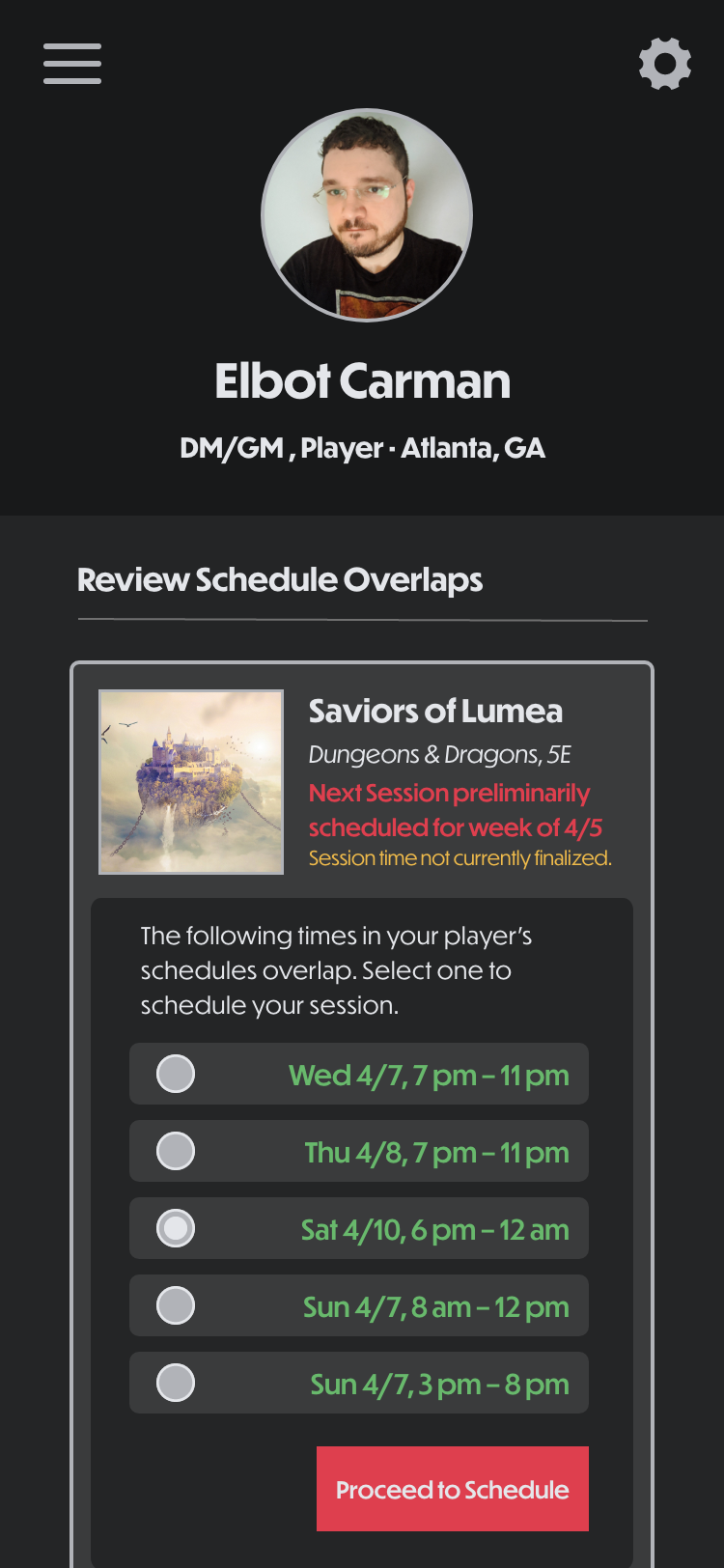
If players' schedules overlap, Palbetto will display the time slots where they do. From there the DM can select a day and time slot to finalize scheduling their session.

After selecting the desired time slot, the DM can specify the finalized times for the session.

When the finalized time is submitted, the DM will get this message.
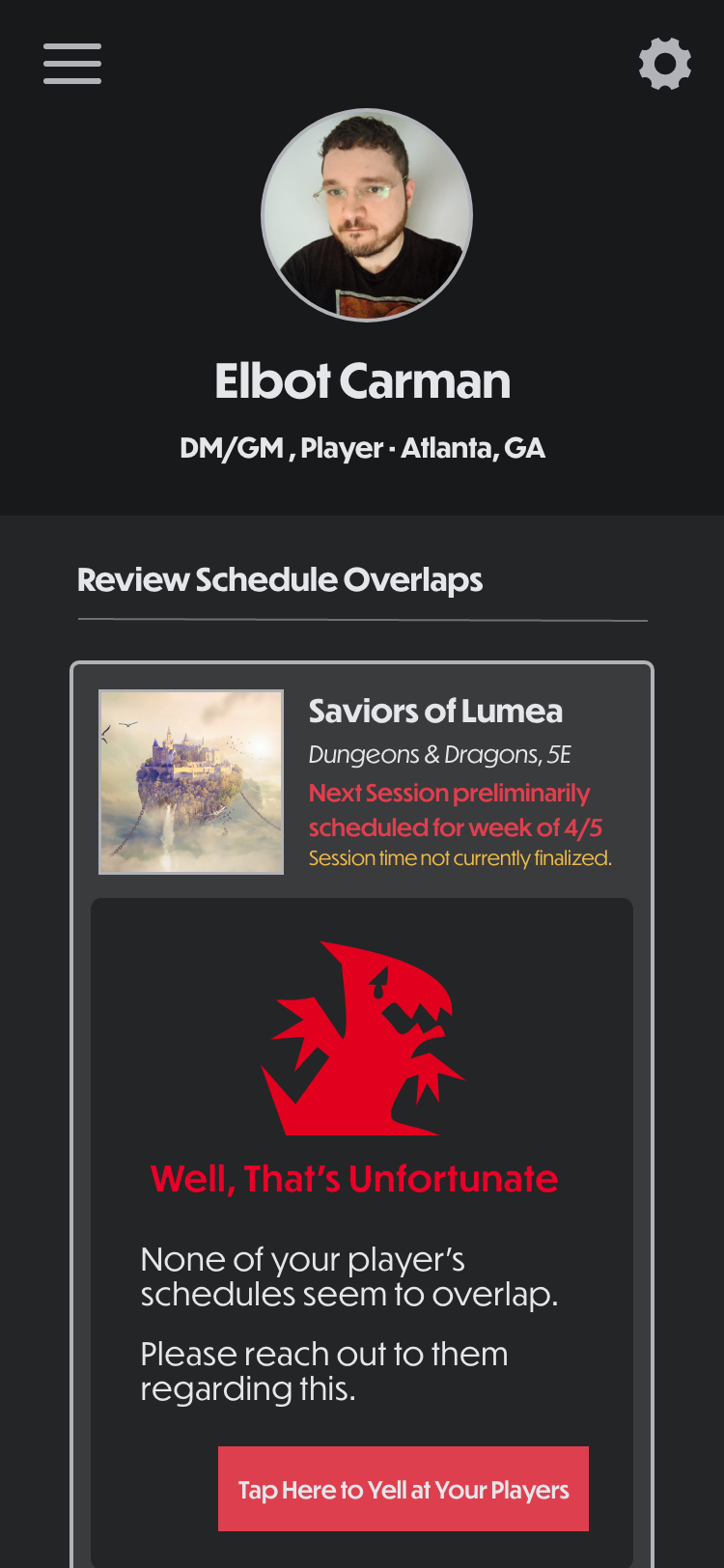
If the schedules of all of the players do not overlap, the DM will get this message. The app will not *actually* yell at the players, but it will send them a sternly worded email regarding the issue.
Phase 3
Examples of the type and frequency of push notifications would send users were generated.
The frequency of notifications will differ in the finalized application based on user testing. They will get more passive-aggressive the longer a user ignores them.


Outcomes & Results
To be seen. The project is still in progress.